2.4 接口调用策略
基本所有功能对象的调用均遵循统一策略。
这里以倾斜摄影图层:MeshLayer为例,详细拆解接口调用的核心逻辑与操作规范。
1.对象创建
阅读api文档内容,了解相关构造所需参数:
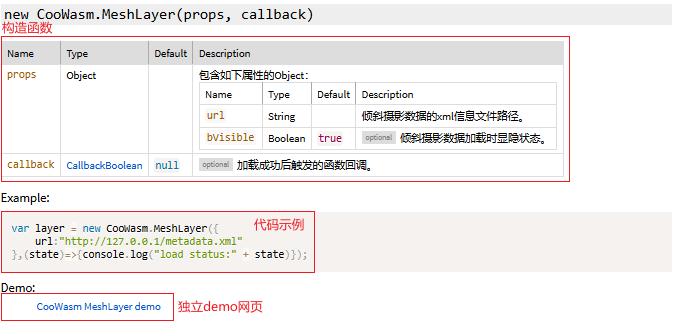
必传参数:无optional标记的参数为必填项。例如 MeshLayer 的
url,必须传入正确的资源路径,否则对象无法正常初始化。
自定义类型参数: 若参数为自定义类型(如callback属于CallbackBoolean类型),需点击跳转查看具体定义。CallbackBoolean包含一个Boolean值,用于返回操作状态(true为成功,false为失败)。
根据文档的提示,可实现如下代码:
let meshLayer = null;
if (meshLayer == null) {
    meshLayer = new CooWasm.MeshLayer({
        url: "http://localhost/data/mesh/metadata.xml",
        callback: (state) => {
            console.log("load MeshLayer:" + state);
        }
    });
}
关键提示:后续方法调用必须依赖callback返回true。
错误示例:
let meshLayer = null;
if (meshLayer == null) {
    meshLayer = new CooWasm.MeshLayer({
        url: "http://localhost/data/mesh/metadata.xml"
    });
    meshLayer.locate();//这是错误的调用方式
}
正确示例:
let meshLayer = null;
if (meshLayer == null) {
    meshLayer = new CooWasm.MeshLayer({
        url: "http://localhost/data/mesh/metadata.xml",
        callback: (state) => {
            if(state){
                meshLayer.locate();//正确的调用方式
            }
        }
    });
}
2.参数更新
当功能效果未达预期时,可使用update()接口修改参数。操作流程与对象创建类似:
1.查阅 API 文档明确可更新参数。 2.传入参数对象及回调函数获取更新结果。
if (meshLayer) {
    meshLayer.update({
        bVisible: false
    }, (state) => { console.log("update MeshLayer:" + state); });
}
关键提示:更新后若需执行其他操作(如定位、销毁),同样需等待callback返回true,确保更新操作已完成。
3.定位
多数功能自带默认定位功能(详见 API 文档说明)。
if (meshLayer) {
    meshLayer.locate( (state) => {console.log("locate done!")} );
}
4.属性获取
有部分属性只读或者动态变化(如DistanceMeasure编辑后的points参数),可通过getProperties()接口获取最新值:
if (meshLayer) {
    meshLayer.getProperties();
    console.log(meshLayer.spatialReference);
}
5.对象销毁
与对象创建类似,后续所有方法调用,都必须在callback返回时,才能继续执行。
if (meshLayer) {
    meshLayer = meshLayer.destroy( (state) => {console.log("destroy status:" + state)} );
}
总结:接口调用的核心在于严格遵循回调机制,确保每个操作的前置条件完成后再执行后续逻辑。建议结合API 文档及CooWasm开发者中心,快速掌握不同功能对象的调用细节。